Using Outset with Rally
Last updated: March 22, 2026
If you choose to recruit participants through Rally, you can seamlessly pass those screened participants into an Outset AI-moderated interview – no CSVs, emails, or manual coordination. This guide covers what Rally is, how the integration works, and when the Rally workflow may or may not be the right fit.
What is Rally?
Rally is a User Research CRM that handles the recruiting, screening, and management of your own users so you can run studies quickly without juggling spreadsheets or manual coordination.
With Rally, teams can:
Recruit from their own users, internal panels, or external sources
Screen and qualify participants before they enter an Outset test
Manage participant history, eligibility, and governance in one place
Automate outreach, reminders, and incentive delivery after completion
Rally centralizes the entire participant workflow, ensuring only the right users reach your Outset study and that incentives are sent automatically once they finish.
Setting up an Outset test in a Rally Study
Here’s the step-by-step guide to connect a Rally study to an Outset test:
1. Create an Unmoderated Test study in Rally
Start a new study in Rally and select Unmoderated Test.
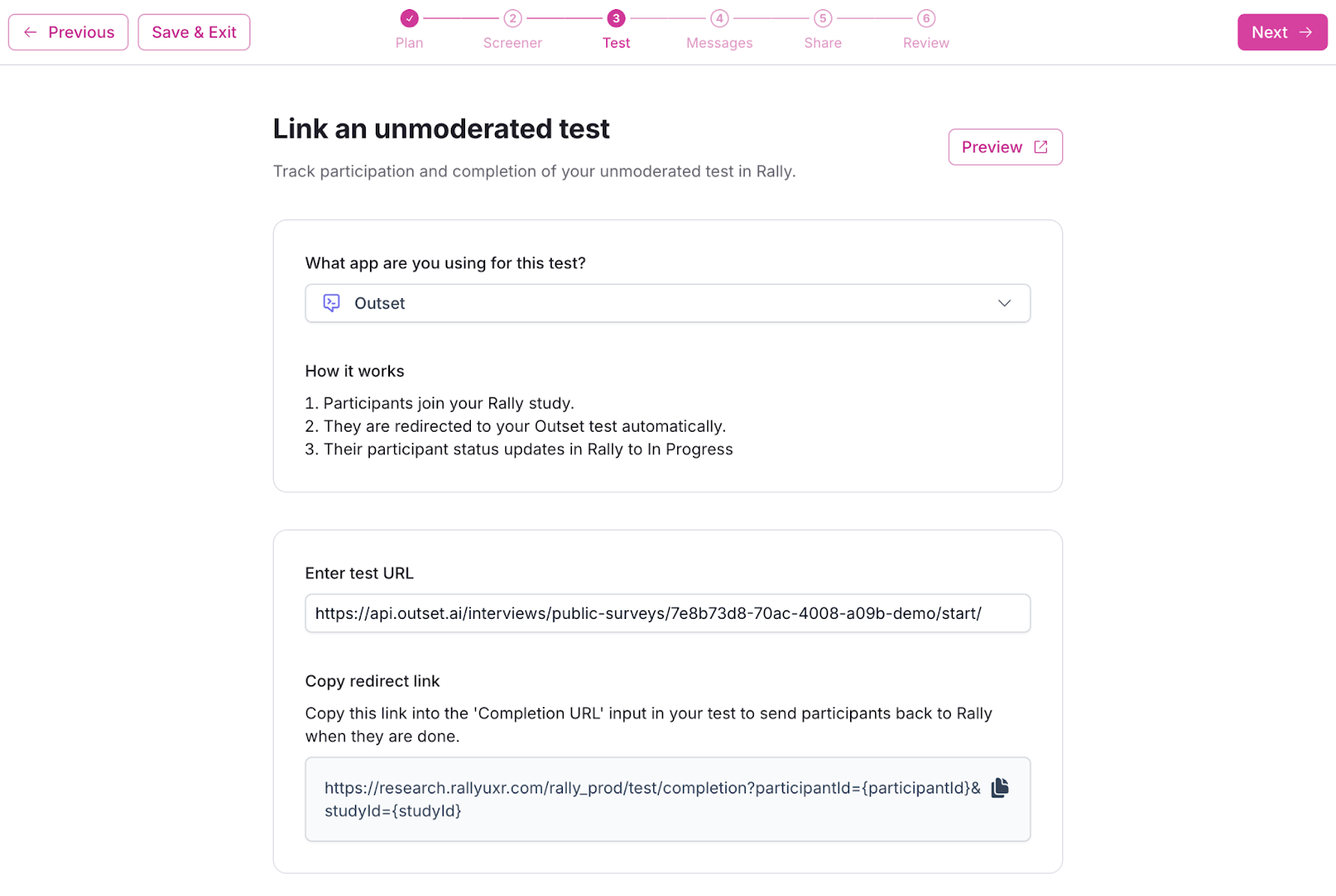
After Steps 1 (Plan) & 2 (Screener), you’ll be prompted to choose a testing tool in Step 3 (Test). Select Outset.
2. Add your Outset test link
In Outset:
Open your project (existing or “New Study”)
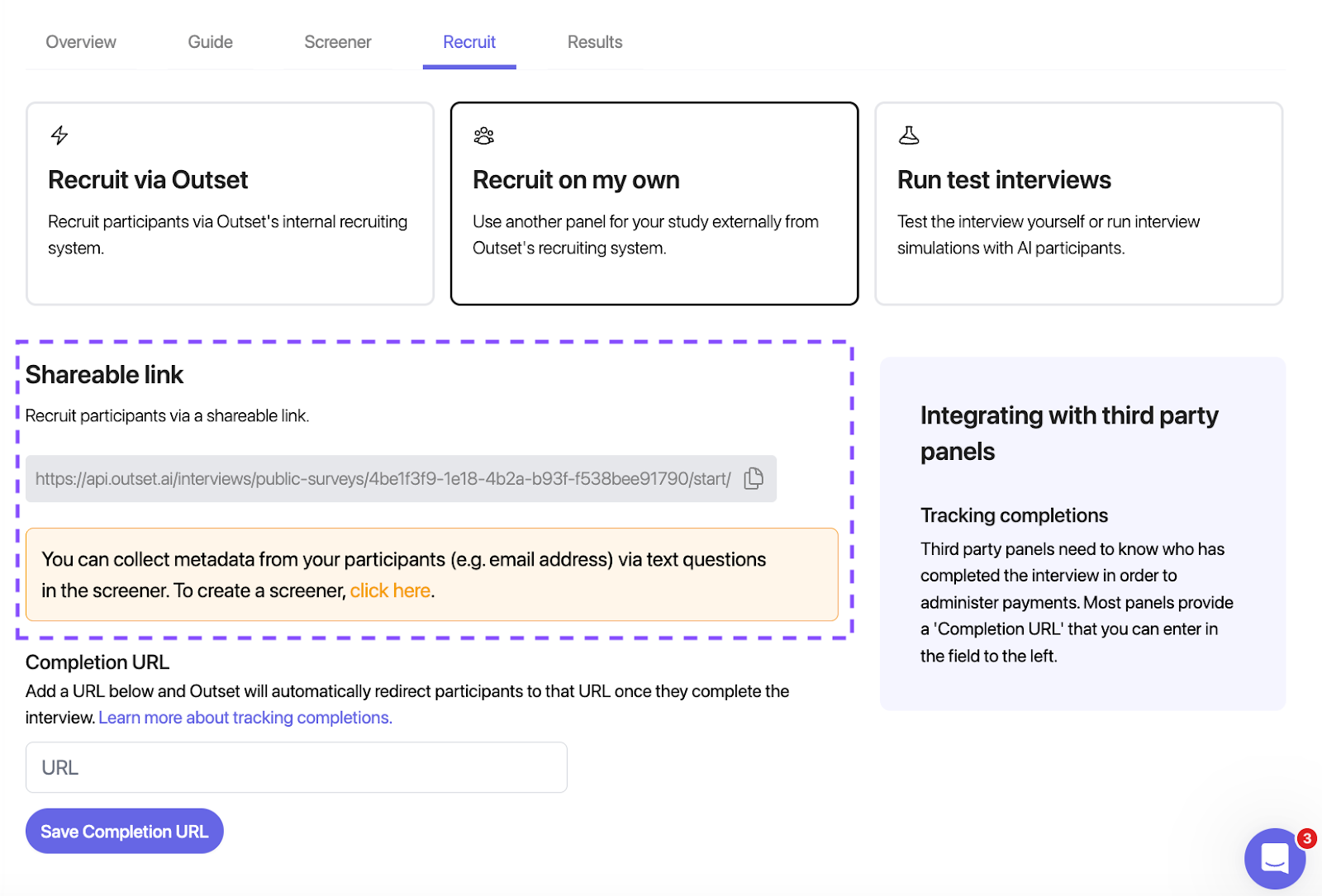
Go to Recruit → Recruit on your own
Copy the Shareable Outset Link (see below)
Then, in Rally:
Paste this link into the Test URL field.
This ensures participants:
Are automatically marked Completed in Rally
Trigger incentive delivery through Rally
Appear with full Rally metadata inside Outset responses
3. Launch your Rally study for participants
After drafting your outreach messages, you’ll reach step 5 (“Share”) where you can choose to send outreach emails to participants in your Rally database, or toggle on “Share a public link” to invite participants via other communities such as LinkedIn or Slack. You can then launch the Rally study to recruit your participants.
Outset then:
Conducts the AI-moderated interviews
Captures insights while Rally manages recruitment, governance, and incentives
When might Rally not be the right fit?
Rally works best when:
You want to talk to your own users
You need participant governance/incentives
Your studies require structured screening workflows
However, Rally may not be the right fit when:
You’re running a one-off study without ongoing participant management needs
Your research doesn’t involve incentives, outreach, or participant governance workflows
In these cases, you can still run Outset tests using:
Your own recruitment methods
Any external panel, including certified Outset partners
DIY recruiting and direct links
Not currently a Rally customer?
If you want access to this integration but don’t yet use Rally, you have options:
Get introduced to Rally — our team can connect you with the Rally team to explore whether their platform is a fit. You can also sign up for an account here (with an optional free trial).
Continue using Outset with your own recruitment — the integration is optional; Outset works with any recruitment source.
FAQ: What if my participants aren’t appearing in Outset?
If respondents pass the screener but don’t show up in Outset, the most common cause is: Participants did not click the redirect button from Rally into the Outset test.
Once participants click the redirect, their session begins immediately and appears in Outset as expected.
If this continues, confirm:
Your Outset link is correct
The redirect button is visible
The Completion URL is set correctly
Participants aren’t being filtered out by browser blockers
FAQ: How does Rally handle completion tracking and reminders for Outset tests?
Rally tracks which participants have completed your Outset task, and you can send bulk reminders to anyone who hasn’t finished yet.
FAQ: Can Rally send or support calendar invites for async Outset studies?
Yes. While Rally’s scheduler is built for moderated sessions, teams can still send calendar holds—either manually or by pairing Rally’s scheduler flow with a separate study. Rally supports editing your availability with customizable controls so participants can book any time.