Visual Intelligence
Last updated: July 14, 2026
Research has always relied on what participants say. Visual Intelligence changes that. It is Outset's suite of AI-powered observation tools that capture what participants show, do, and feel during an interview — surfacing signals that spoken responses alone can't provide.
Visual Intelligence includes three distinct capabilities, each designed for a different research context: Emotional Intelligence, Digital Intelligence, and Physical Intelligence. All three enrich your transcripts and Insights with AI-generated observations, helping you move from surface-level responses to deeper, more grounded understanding.
Visual Intelligence observations are now accessible in the results tab!
1. Emotional Intelligence
Emotional Intelligence uses AI-powered video analysis to detect and surface emotional signals during video interviews in real time. As participants respond, the AI observes facial expressions and generates time-stamped annotations that appear in your transcript, Insights, and Results pages, helping you understand not just what participants said, but how they felt when they said it.
It maps observed expressions to seven emotional states based on Paul Ekman's universally recognized emotion categories: Anger, Disgust, Fear, Happiness, Sadness, Surprise, and Neutral. Each detected moment includes an emotion label, intensity, and plain-language evidence of what was observed (e.g., "smile appears," "brows furrowed").
⚠ Tone-of-voice and speech emotion analysis are not included. Emotional Intelligence is based on facial expression and words they actually said only and is available for video response interviews only.
Common use cases:
Concept testing — detect genuine delight or surprise reactions to new ideas
Ad and creative testing — measure emotional engagement across different executions
Product feedback — identify frustration or confusion moments during a product walkthrough
Usability testing — catch anxiety or hesitation at specific steps in a flow
2. Digital Intelligence
Digital Intelligence is a silent AI observer that watches your usability sessions in real time, flags moments of confusion, frustration, or success, and probes participants with targeted follow-up questions based on what it actually observed — not just what they reported. It is particularly useful when you want to understand where participants got lost, why they clicked where they did, or what on screen caused them to hesitate.
Digital Intelligence activates automatically for any task-type question in desktop and mobile usability studies — no additional section type or guide setup required.
During a task, the AI detects behavioral signals such as dead clicks, repeated clicking in the same spot (rage clicks), and frequent use of the back button. Once the task is complete, it delivers prioritized observations to the AI moderator, which then probes participants with targeted follow-up questions grounded in what happened.
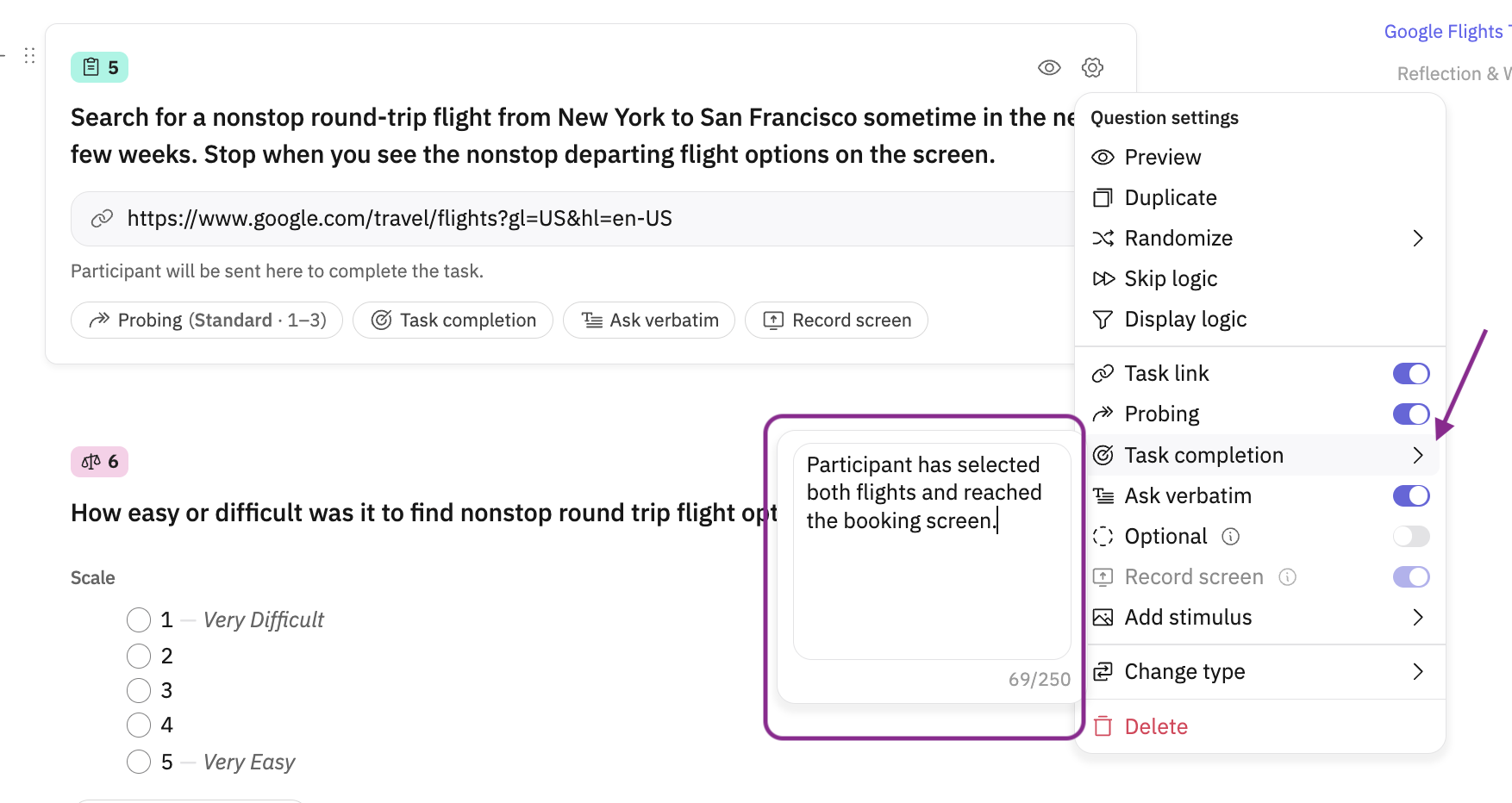
You can add instructions to what defines a task completion so that the AI can better detect with things go wrong. For example, if you the task requires the participant to reach a booking site, you can input instructions for the AI that the task is successfully complete if the participant reaches the booking site. See the screenshot below for where to input these instructions:
As a rule of thumb, the more context you give the AI — via task prompts, AI context fields, and research briefs — the better it can identify where things went wrong and why.
Try clicking “Allow interviewer to dynamically probe once they finish the task” for best results - the interviewer can immediately dig in on high priority moments of confusion or frustration.
Common use cases:
E-commerce checkout flows — surface dead clicks and rage clicks at critical payment steps
Onboarding evaluation — identify flow discontinuities and instruction/UI mismatches
Dashboard usability — detect cognitive overload from dense layouts or too many options
Navigation testing — flag frequent back-button use and unclear navigation paths
3. Physical Intelligence
Physical Intelligence enables participants to upload photos during an interview — of their home, workspace, products, or surroundings — and lets the AI moderator analyze those images in real time to ask smarter, more contextual follow-up questions.
It introduces a new Participant Upload section type in your guide, and is particularly useful when the research question lives in the physical world: what's in someone's pantry, what products are on their shelves, or how they interact with a device at home.
When a participant uploads a photo, the AI validates it against your prompt, generates a text summary of what it sees, and tags the objects and elements visible in the image These item tags are surfaced at the individual transcript level and in aggregate across all participants, making it easy to spot patterns in what people photographed.
Be specific in your upload prompt. The more clearly you describe what you're looking for, the better the AI can validate the image and generate relevant follow-up questions.
Common use cases:
Pantry and kitchen audits — ask participants to photograph their fridge or pantry shelves
Product shelf research — capture in-context product discovery and placement
Home environment studies — understand how people actually live and use spaces
Wearables and hardware — have participants photograph themselves using or wearing a product
Hope this helps! If you have any further questions, please reach out to our team at support@outset.ai or via chat.